Object detection explained in one sentence: it is the computer vision task of finding objects in an image and drawing a box around each one, together with a label saying what it is. How does a machine do that? It learns from thousands of labelled examples, then scans a new image in one pass, proposes regions that might contain objects, and scores each region against the categories it knows.
Detection sits between two simpler tasks. Classification answers only what is in an image, while segmentation labels every pixel. Detection answers both what is present and where it is, which is why it powers self-driving cars, warehouse robots, retail shelf checks and security cameras. The rest of this guide explains how detection works, how the main model families differ, and how to pick one for a real project.
Key takeaways
- Object detection finds objects, draws a bounding box around each one, and assigns a class label with a confidence score.
- Single-stage detectors such as YOLO are fast and suit real-time video; two-stage detectors such as Faster R-CNN trade speed for accuracy.
- Transformer-based detectors such as DETR remove hand-tuned steps but need more training data and compute.
- Accuracy is measured with mean average precision, usually reported on the COCO dataset at a fixed image size.
- For a new project in 2026, YOLO26 is the default starting point, with YOLO11 as the battle-tested fallback.
What is object detection?
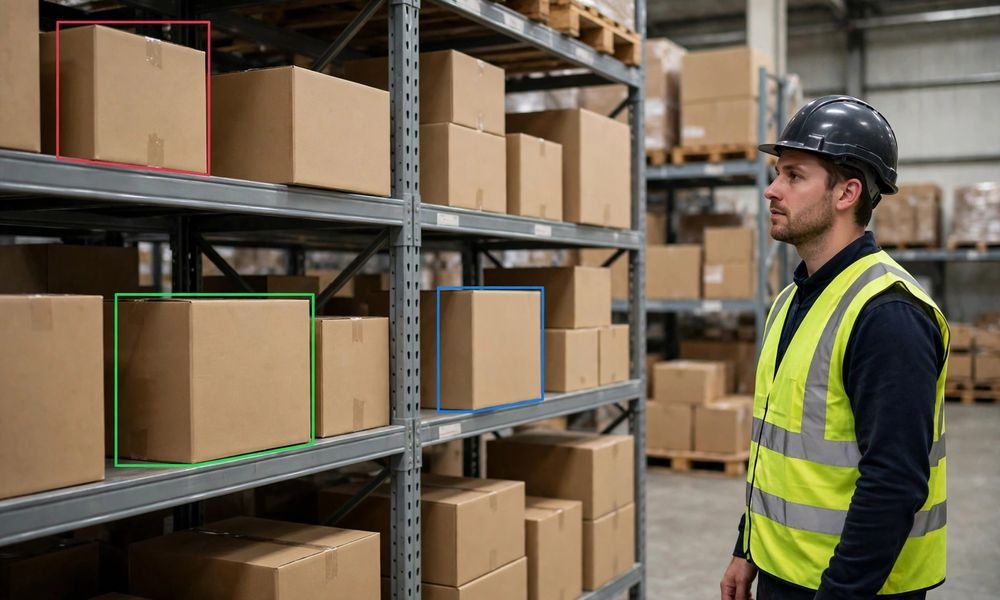
Object detection takes an image as input and returns a list of detections. Each detection has four numbers describing a rectangle, a class label such as car or person, and a confidence score between zero and one. A single image can produce dozens of detections, and the same object can be detected more than once at slightly different positions.
That duplication is why every detector needs a clean-up step. Non-maximum suppression, usually shortened to NMS, compares overlapping boxes for the same class and keeps only the highest-scoring one. It is a simple idea with a real cost: NMS is a hand-tuned post-processing step, and the newest detectors are designed to remove it entirely.
How object detection works
Most modern detectors share three parts. A backbone network, often a convolutional network such as ResNet or a transformer such as a Vision Transformer, turns pixels into feature maps that describe edges, textures and shapes at several scales. A neck merges those feature maps so that small objects and large objects are both visible to the detector. A head then reads the merged features and predicts boxes, classes and confidence scores.
Training needs labelled data. Annotators draw boxes around every object of interest and label each box, and the model learns by comparing its predictions with those labels thousands of times. The standard public benchmark is COCO, a dataset of everyday scenes with 80 object categories, from people and cars to cups and chairs. Results on COCO are the common currency for comparing detectors.
Single-stage detectors: YOLO and SSD
Single-stage detectors predict boxes and classes directly from the feature maps in one forward pass. They are the fastest family, and they dominate real-time work. The best-known member is YOLO, short for You Only Look Once, first published by Joseph Redmon and colleagues in 2015. Its core idea was radical at the time: treat detection as a single regression problem instead of a pipeline of separate steps.
The YOLO family has moved quickly since then. YOLOv8 arrived in January 2023, YOLO11 followed in September 2024, YOLOv12 in February 2025, and YOLO26 in January 2026. YOLO26 is NMS-free end to end, which removes the hand-tuned clean-up step, and Ultralytics reports it running up to 43 per cent faster on CPU than YOLO11 in its smallest size. YOLO11 remains the safe choice when you want the widest ecosystem of tutorials, integrations and pre-trained weights.
Best for: real-time video, edge cameras, robotics and any project where latency matters more than squeezing out the last point of accuracy.
SSD, short for Single Shot MultiBox Detector, was published in 2016 and shares the one-pass idea. It predicts boxes from feature maps at several scales, which helps it catch objects of different sizes. SSD is less common in new projects today, but it still appears in embedded systems and older codebases where its small footprint matters.
Best for: lightweight embedded deployments and legacy systems where a small, well-understood model is more valuable than the latest accuracy.
Two-stage detectors: Faster R-CNN
Two-stage detectors split the job in two. The first stage proposes regions that might contain an object, and the second stage classifies each region and refines its box. Faster R-CNN, published in 2015, is the classic example, and its region proposal network was the innovation that made the two-stage approach fast enough to use.
The extra stage buys accuracy. Because the second stage looks closely at each proposed region, two-stage detectors usually draw tighter boxes and handle crowded scenes better than single-stage models of the same era. The price is speed: running a classifier over hundreds of regions costs time, so two-stage models rarely run at full video frame rates on modest hardware.
Best for: accuracy-critical work on still images, such as medical scans, satellite imagery and detailed defect inspection.
Transformer detectors: DETR and its successors
DETR, published by researchers at Facebook AI in 2020, rebuilt detection around the transformer architecture. Instead of anchor boxes and NMS, it treats detection as a set prediction problem: the model outputs a fixed number of predictions and learns to match them to the true objects. The result is a cleaner pipeline with fewer hand-tuned parts.
The original DETR trained slowly and struggled with small objects, which limited its adoption. Later versions fixed much of that. Deformable DETR improved small-object accuracy, and RT-DETR, a real-time variant, brought transformer detection close to YOLO speeds while keeping the simpler design. These models are now a serious option rather than a research curiosity.
Best for: research projects, multimodal systems and teams that want a clean, modern architecture with no NMS step.
Object detection models compared
The table below compares the main detector families on the factors that decide a real project. Accuracy figures are reported as mean average precision on COCO, and they vary with input size and model size, so treat them as a guide rather than a promise.
| Model family | Speed | Accuracy | Main strength | Main weakness |
|---|---|---|---|---|
| YOLO26 | Very fast | High | NMS-free, strong ecosystem | Newest, fewer long-term case studies |
| YOLO11 | Very fast | High | Mature, widest tooling support | Needs NMS post-processing |
| Faster R-CNN | Slow | Very high | Tight boxes, crowded scenes | Too slow for live video on most hardware |
| SSD | Fast | Moderate | Small footprint, simple design | Weaker on small objects |
| DETR / RT-DETR | Moderate to fast | High | Clean design, no anchors or NMS | Needs more data and compute to train |
Choosing a detector: a decision framework
Work through these questions before you commit to a model. Each one narrows the field, and the answers usually point to a clear winner.
- How fast must it run? Live video at 30 frames per second points to YOLO26 or YOLO11. Still images or batch processing open the door to Faster R-CNN or DETR.
- Where will it run? A GPU server can run almost anything. A camera, a phone or a factory edge box needs a small model, often a nano or small variant with a quantised runtime.
- How many categories? A handful of classes trains quickly and tolerates a small dataset. Dozens of classes, or rare ones, need more labelled images and a stronger backbone.
- How small are the objects? Small or distant objects need higher input resolution and a model with good multi-scale features. Budget for this early, because it drives compute cost.
- What does a mistake cost? A missed defect on a production line costs more than a missed pedestrian count in a retail dashboard. Match the accuracy bar to the consequence, not to the benchmark.
- Who will maintain it? A model with a large community, clear documentation and a maintained runtime is worth more than a slightly more accurate model nobody on your team understands.
Once you have answers, prototype with a pre-trained model before collecting custom data. Run YOLO26 or YOLO11 on your own footage and see what it already detects. Many projects discover that a pre-trained model covers most of their needs, and that fine-tuning on a few hundred of their own images closes the rest of the gap. For guidance on taking a trained model into production, read our guide to vision model deployment.
Common problems and how to fix them
Small objects are the most common failure. A detector trained on images where people fill the frame will miss people in the distance, because the features are too small to survive downsampling. The fixes are higher input resolution, tiling the image into crops, or training with more small-object examples.
Class imbalance is the second trap. If 95 per cent of your labels are one class, the model learns to predict that class everywhere and ignore the rest. Balance the dataset, use focal loss or class-weighted sampling, and check per-class accuracy rather than a single overall score.
Lighting and camera angle cause the third class of failures. A model trained on daylight footage will struggle at night, and a model trained on eye-level photos will struggle with overhead cameras. Collect training data from the same cameras, angles and lighting conditions the system will face in production, or use augmentation to simulate the variation.
Where object detection is used
Transport is the most visible use. Self-driving systems detect vehicles, pedestrians, cyclists and road signs many times per second, and traffic cameras count vehicles and spot congestion. Retail uses detection for shelf monitoring, checkout-free stores and loss prevention. Warehouses use it to track parcels, guide robots and check that pallets are stacked correctly.
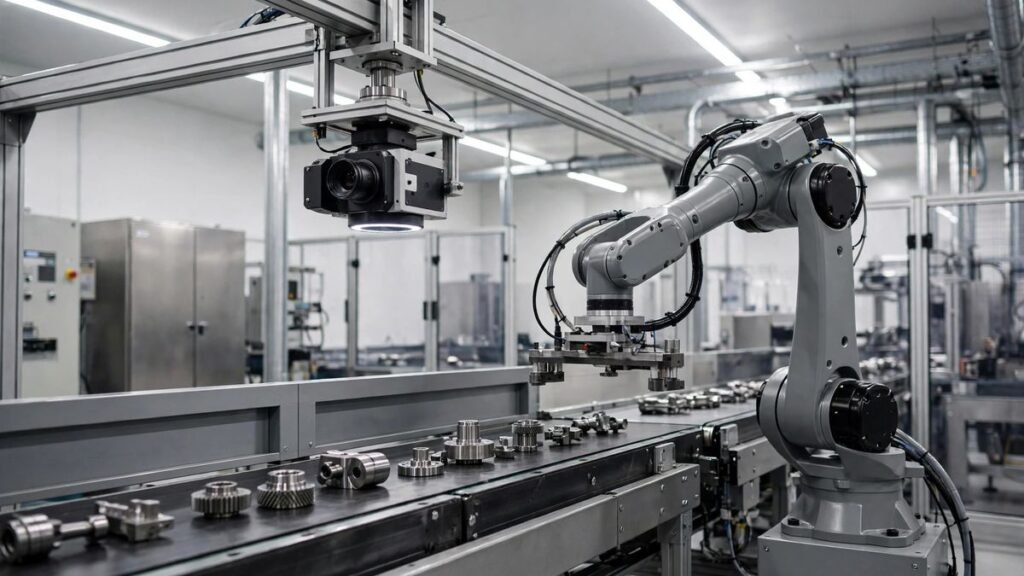
Manufacturing is growing fast. Cameras on production lines detect defects, verify assembly steps and read labels, often running on edge hardware beside the line. Our guide to AI image processing architecture explains how these systems are put together, from camera to decision.
Frequently asked questions
What is the difference between object detection and image classification?
Classification answers what is in an image with a single label. Detection answers what is present and where, returning a box and a label for every object it finds. Detection is the harder task and the more useful one when position matters.
What is the difference between object detection and instance segmentation?
Detection draws a rectangle around each object. Instance segmentation goes further and labels every pixel belonging to each object, producing a precise outline. Segmentation is more accurate for measuring shape and area, but it needs more compute and more detailed training labels.
Which object detection model should I start with?
Start with YOLO26 for a new real-time project, or YOLO11 if you want the most mature ecosystem. Both have pre-trained weights on COCO, run on CPU and GPU, and support detection, segmentation and tracking in the same package.
How much training data do I need for object detection?
It depends on the number of classes and how different your images are from the pre-trained model’s data. Fine-tuning a pre-trained model often works with a few hundred labelled images per class. Training from scratch needs far more, typically tens of thousands of images, and is rarely necessary.
What is mAP in object detection?
Mean average precision, or mAP, is the standard accuracy metric. It averages precision across all classes and across several IoU thresholds, so it rewards both finding objects and drawing tight boxes.
Can object detection run on a camera without a server?
Yes. Small models such as YOLO26 nano run on edge devices, including cameras with built-in AI chips, single-board computers and phones. The trade-off is accuracy: edge models use lower resolution and fewer parameters, so they miss more small or unusual objects than a server model.