Facial recognition explained in plain terms is a technology that uses a camera and software to identify a person from the features of their face. The central question is how a machine can pick one face out of a crowd, and the short answer is that it measures the distances and proportions between facial features, turns those measurements into a mathematical pattern, and compares that pattern against a database of known faces to find the closest match.
Most people meet this technology every day without thinking about it. Unlocking a phone with a glance, passing through an automated border gate at an airport, and tagging friends in a photograph all rely on the same basic idea: a face can be treated as a pattern that a computer can read.
The technology has spread quickly because cameras are now everywhere and the software has become fast enough to work in real time. That speed is also the reason it attracts debate, since a system that can identify anyone in a crowd raises questions about privacy, accuracy, and consent that simpler security tools never did.
Key takeaways
- Facial recognition turns the features of a face into a mathematical pattern that can be compared against stored records.
- The process has four stages: detection, alignment, feature extraction, and matching.
- Modern systems work in real time and can identify a face in a crowd in under a second.
- Common uses include phone unlocking, border control, photo organisation, and finding missing people.
- Accuracy varies with lighting, angle, and image quality, and the technology raises serious privacy concerns.
What facial recognition is
Facial recognition is a form of biometric identification, which means it identifies people from a physical characteristic rather than from something they know, like a password, or something they carry, like a key card. Your face is the credential, and the camera is the reader.
It is worth distinguishing recognition from detection. Detection simply notices that a face is present in a photograph, which is how a camera knows where to focus. Recognition goes further: it asks whose face it is, and answers by matching the face against a set of known identities. A phone that unlocks only for its owner is doing recognition; a camera that puts a box around every face in a picture is doing detection.
There are two main kinds of system. One-to-one matching, called verification, checks whether a face belongs to the person it claims to be, as when a phone compares your face with the one stored on the device. One-to-many matching, called identification, searches a whole database for the person who best matches an unknown face, as when police compare a photograph from a camera with a database of suspects.
How facial recognition works
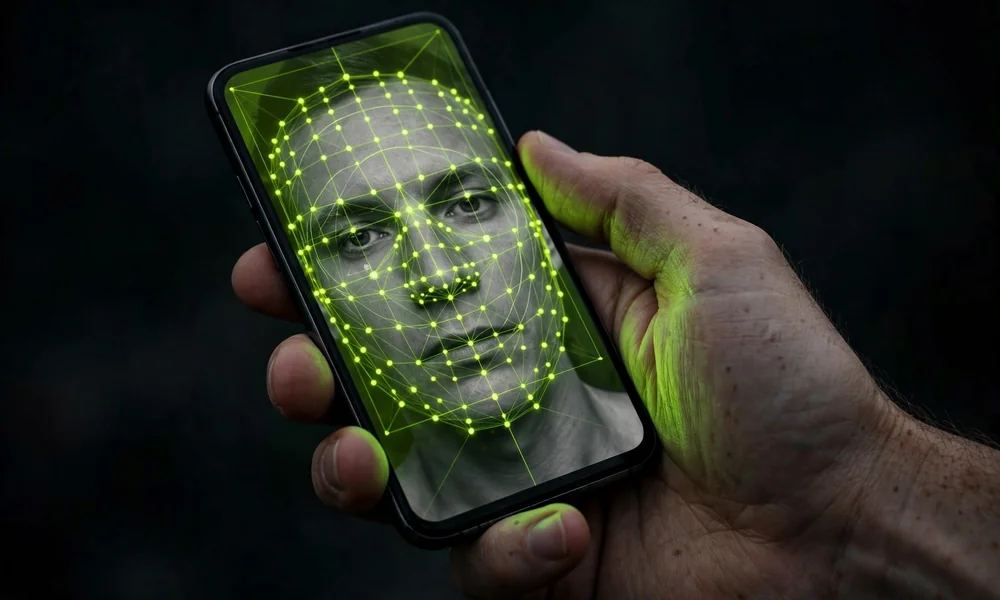
The process begins when a camera captures an image of a face. Software scans the image for the pattern of a human face, locating the eyes, nose, and mouth, and then aligns the face so that it is upright and centred, regardless of how the person was holding their head. This step matters because a tilted or partly turned face is much harder to match reliably.
Next comes feature extraction. The software measures dozens of points on the face: the distance between the eyes, the width of the nose, the shape of the jawline, and the depth of the eye sockets. These measurements are combined into a compact set of numbers, often called a faceprint, which acts as a mathematical summary of that face. Two photographs of the same person should produce similar faceprints, while different people produce different ones.
Matching is the final step. The system compares the new faceprint with the ones stored in its database and calculates a similarity score for each. If the best score passes a threshold set by the operator, the system reports a match; if none passes, it reports no match. The threshold is a trade-off: set it low and the system matches more often but makes more mistakes, set it high and it is stricter but may fail to recognise the right person. Our guide to machine learning explains how these systems learn from thousands of example faces, improving their accuracy with every new set of training images.
Modern systems add a further step called liveness detection, which checks that the face in front of the camera belongs to a living person rather than a photograph or a video. It may ask the user to blink, turn their head, or smile, or it may use a depth sensor to confirm that the face has real three-dimensional shape. Without this check, a printed photograph could fool a basic system. Our guide to computer vision explains the techniques that let a machine find and analyse faces in an image, which is the foundation of the whole process.
Comparing facial recognition with fingerprint recognition
Facial recognition and fingerprint recognition are the two biometric systems most people encounter, and they solve the same problem in different ways. A fingerprint must be pressed against a sensor, while a face can be read from a distance, which makes facial recognition faster and more convenient but also easier to use without the person’s knowledge.
The table below sets out the main contrasts.
| Aspect | Facial recognition | Fingerprint recognition |
|---|---|---|
| How it works | Camera measures facial features from a distance | Sensor reads the ridges of a fingertip |
| Contact needed | No, works without touch | Yes, finger must touch the sensor |
| Speed | Very fast, under a second | Fast, under a second |
| Accuracy | Good, but affected by light and angle | Very high, stable across conditions |
| Main concern | Can identify people without consent | Prints can be lifted from surfaces |
Where facial recognition is used
Phone unlocking is the most familiar use. Modern phones project thousands of tiny infrared dots onto the face to build a three-dimensional map, which is stored on the device and never sent to the manufacturer. The system works in the dark, adapts to changes such as a new beard or glasses, and has largely replaced the fingerprint sensor on many flagship phones.
Airports and border crossings use the technology to speed up queues. At an automated gate, a camera compares the traveller’s face with the photograph stored in their passport, and the gate opens if the two match. Airlines have trialled systems that let passengers board a plane with a glance instead of a boarding pass, though these remain controversial.
Police and security services use facial recognition to search for suspects and missing people. Cameras in public places can compare faces in a crowd against a watchlist in real time, and investigators can search photographs and video for a person of interest. These uses are the most debated, since they involve scanning people who have not consented and may not know they are being identified.
Quieter uses are common too. Photo apps group pictures by the people in them, so a family can find every photograph of one child in seconds. Shops have tested the technology to spot known shoplifters, workplaces use it to record attendance, and some schools use it to take the register. In each case the same trade-off appears: convenience against the risk of being watched without realising it.
Strengths and limits
The greatest strength of facial recognition is convenience. There is nothing to remember, nothing to carry, and nothing to touch, which makes it fast in places where queues matter, such as airports and stadiums. It is also hard to lose or forget, since your face is always with you, and it can work at a distance, which no other common biometric can do.
For security, the technology has genuine value. A face is much harder to share or steal than a password, and a system that checks liveness is difficult to fool with a photograph. Combined with a human check, it can help find missing children and identify people who are unable to say who they are.
The limits are serious and well documented. Accuracy drops in poor light, at awkward angles, and with low-quality cameras, and independent tests have repeatedly found that some systems are less accurate for women and for people with darker skin. A false match can lead to a wrongful arrest, and because a face cannot be changed like a password, a leaked faceprint is a permanent problem. These concerns have led several cities and countries to restrict or ban the technology in public places.
Facial recognition checklist
- Understand the difference between detection, which finds faces, and recognition, which identifies them.
- Check whether a system stores your faceprint on the device or sends it to a remote server.
- Ask what happens to your data, and whether it is deleted after use.
- Know that accuracy varies with lighting, angle, and the quality of the camera.
- Remember that a faceprint cannot be changed like a password if it is leaked.
- Check whether a system uses liveness detection before trusting it for security.
- Read the privacy policy of any app or service that scans your face.
- Be aware that some cities and countries restrict facial recognition in public places.
- Consider whether a simpler option, such as a passcode, would serve just as well.
Frequently asked questions
What is facial recognition in simple terms?
Facial recognition is a technology that identifies a person from the features of their face. A camera captures an image, software measures the distances between facial features, and the result is compared against stored records to find a match.
How accurate is facial recognition?
Accuracy varies widely. The best systems in controlled conditions, such as a phone unlock, are extremely accurate, but accuracy falls in poor light, at awkward angles, and with low-resolution cameras. Independent tests have also found that some systems perform less well on women and on people with darker skin.
Can facial recognition be fooled by a photograph?
A basic system can be fooled, but modern systems use liveness detection to prevent it. They check for signs of life, such as blinking or head movement, or use a depth sensor to confirm that the face has real three-dimensional shape, which a printed photograph does not.
Is my face data stored when I unlock my phone?
On most modern phones, the faceprint is stored on the device itself in a secure part of the chip, and it is never sent to the manufacturer or stored in the cloud. Other systems, such as airport gates and security cameras, may store face data on remote servers, so it is worth checking each service.
What is the difference between facial recognition and face detection?
Face detection simply notices that a face is present in an image, which is how a camera knows where to focus. Facial recognition goes further and identifies whose face it is, by matching it against a database of known faces.
Where is facial recognition banned or restricted?
Several cities have banned police use of facial recognition in public places, and the European Union has restricted its use for real-time identification in public spaces. Rules vary by country and are still changing, so the legal position depends on where you are.
The bottom line
Facial recognition explained in one line is this: a camera measures the features of a face, turns them into a mathematical pattern, and compares that pattern with stored records to decide who someone is.
The technology is fast, convenient, and genuinely useful in places such as phone unlocking and border control, but its accuracy is not perfect and its privacy implications are unlike any other security tool. That combination is why it is both widely adopted and widely argued about.
This article is general information about how facial recognition works, not advice about using the technology for security or identification in a particular setting.