
Agent CRM integration is the connection between an AI agent and a customer relationship management system, so the agent can read customer records, update them, draft follow-ups and surface insights without a person copying data between tools. A sales rep can ask the agent for a summary of an account before a call, and the agent can pull the deal history, the last emails and the open tasks, then draft the follow-up afterwards. The central question is whether the agent can be trusted with customer data, and the answer is yes, when the connection is scoped to the right records, every change is logged and a human approves anything that reaches a customer.
A CRM is the memory of a business’s customer relationships, which makes it both the most valuable place to connect an agent and the most sensitive. Done well, the integration removes the admin work that eats into selling time and keeps records accurate. Done badly, it can corrupt data, expose information to the wrong people or send a message a rep would never have approved.
Key takeaways
- Agent CRM integration lets an agent read, update and act on customer records on a person’s behalf.
- The biggest wins are pre-call briefs, follow-up drafts, data hygiene and pipeline summaries.
- Permissions must be scoped to the records and actions each agent genuinely needs.
- Every agent change should be logged, reversible and easy to review.
- Start with read-only access, prove the value, and add write access in stages.
What is agent CRM integration?
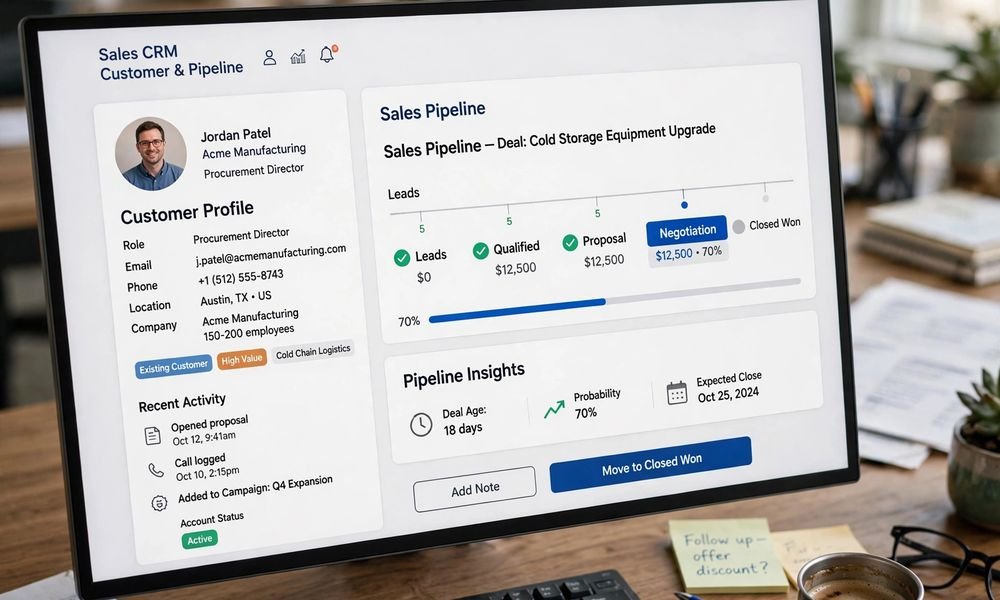
Agent CRM integration connects an AI agent to a CRM such as Salesforce, HubSpot or Zoho through the CRM’s application programming interface or through a built-in integration. Once connected, the agent can look up accounts, contacts, deals and activities, and, if given permission, create or update records, log calls and draft messages.
The difference from a simple dashboard is that the agent works in conversation and across steps. A rep can ask for the full picture on an account in plain language, and the agent gathers it from several places: the deal record, the email history, the support tickets and the last meeting notes. It can then draft a follow-up email, update the deal stage and set a reminder, all from one request.
Integration is not the same as automation for its own sake. The point is not to remove people from customer relationships but to remove the admin work around them, so reps spend their time talking to customers instead of typing into fields. For a broader view of how AI fits customer-facing work, see our guide to AI in enterprise customer support, which covers where it works and where it backfires.
What agents can do inside a CRM
The useful jobs cluster around four patterns: briefing, drafting, cleaning and summarising. Each one suits a different level of access, and each needs different guardrails.
Pre-call briefs and account summaries
Before a call, an agent can pull together everything the rep needs: the account’s history, the open deals, the last interactions, any open support issues and the names of the people involved. This is the safest and most popular starting point, because it is read-only and the rep checks the brief before using it. Best for: sales teams with long account histories, where preparation currently takes longer than the call itself.
Briefs work best when the agent cites its sources. A summary that says a deal is at risk should say why: the last email, the missed meeting or the support ticket. Without that, the rep cannot tell a genuine warning from a guess.
Follow-up drafts and activity logging
After a call or meeting, an agent can draft the follow-up email, log the activity in the CRM and update the deal record with the agreed next steps. The rep reviews the draft before sending, which keeps the human voice in the message while removing the typing. Best for: reps who handle many meetings a day and struggle to keep records up to date.
The draft is where quality shows. A good follow-up reflects what was actually discussed, names the agreed actions and sounds like the rep, not a template. If the agent cannot see the meeting notes or the call transcript, its drafts will be generic, and generic follow-ups are worse than none.
Data hygiene and enrichment
CRMs decay. Contacts leave, companies merge, fields go stale and duplicates creep in. An agent can spot duplicates, flag records missing key fields, fill in information from reliable sources and keep the data clean over time. Best for: CRMs with thousands of records where manual cleaning is no longer realistic.
Data hygiene needs care, because a wrong merge or a wrong update is hard to undo. Start with flagging and suggesting, and only move to automatic updates once the agent’s suggestions have been right often enough to trust. Keep a log of every change, so a mistake can be reversed.
Pipeline summaries and forecasting support
An agent can summarise the pipeline for a manager: which deals moved this week, which are stuck, which need attention and what changed since the last review. It can prepare the weekly pipeline review so the meeting starts with the facts instead of a hunt for them. Best for: sales managers who run weekly reviews and need an accurate picture without manual reporting.
Summaries are support, not judgement. An agent can say a deal has not moved in thirty days; it should not decide the deal is lost. That decision belongs to the rep and the manager, who know the context the CRM does not hold.
Comparing integration approaches
| Approach | How it works | Main strength | Main risk |
|---|---|---|---|
| Read-only agent | Agent reads CRM data, never writes | Safe starting point, no data risk | Limited value, cannot update records |
| Draft-and-approve | Agent drafts changes, a person approves them | Good balance of speed and control | Approvals can become a bottleneck |
| Scoped write access | Agent writes to defined fields and objects | Real automation of admin work | Needs tight permissions and logging |
| Full agent access | Agent can read and write anything | Maximum flexibility | High risk of errors and exposure |
| Manual entry | People type everything by hand | Full human control | Slow, inconsistent and often skipped |
Most teams move through these stages in order: read-only first, then draft-and-approve, then scoped write access for the safest fields. Full agent access is rarely the right choice, because the risk is high and the extra value over scoped access is small. The table above shows the trade-off at each stage.
Setting up the integration safely
A CRM holds your customer relationships, so the integration deserves the same care as any access to sensitive data. Three areas matter most: permissions, logging and review.
Permissions come first. Decide which records the agent can read, which fields it can write and what it can never do, such as deleting records, changing deal values or emailing customers directly. Scope access by role and by object, and test it before the agent goes live. Our guide to AI agent permissions explains how to scope access without breaking workflows.
Logging comes second. Every change the agent makes should be recorded: what it changed, what it changed it from, and when. That log is what lets you spot a bad update, reverse it and work out what went wrong. Our guide to AI agent observability covers tracing what your agents actually do, which is the foundation of any audit.
Review comes third. For anything that reaches a customer, a person should check it first. For internal updates, a sampling check is often enough: review a share of the agent’s changes each week and track the error rate. If the error rate rises, narrow the scope until it falls again.
Choosing the right approach for your team
The right approach depends on your CRM, your data and your team’s habits. Start from the work: which admin tasks take the most time, which records are most often out of date, and what a good outcome looks like. Then match the job to the simplest integration that can do it.
If the job is briefing and summarising, read-only access is enough and it is the safest place to start. If the job is follow-ups and activity logging, draft-and-approve gives you the speed without the risk of an unreviewed message. If the job is data hygiene, scoped write access to a few fields is usually enough. And if the job needs a change to another system as well, such as the CRM and the billing tool together, that is where an agent with broader access earns its keep, but only with the permissions and logging to match.
Data quality decides the outcome. An agent connected to a messy CRM will produce messy briefs and wrong updates, and no amount of prompt engineering fixes that. Before expanding the integration, clean the fields the agent relies on, agree on how they should be filled in, and make sure the team keeps them that way. Our guide to enterprise AI data integration explains why data quality decides whether AI projects succeed or fail.
CRM integration rollout checklist
- One use case is chosen for the pilot, such as pre-call briefs or follow-up drafts.
- The agent starts with read-only access and earns write access in stages.
- Permissions are scoped to the records, fields and actions it genuinely needs.
- Every agent change is logged with the old and new values.
- Anything that reaches a customer passes a human review step first.
- Duplicate and stale records are cleaned before the agent relies on them.
- The agent cites its sources in briefs and summaries.
- A sample of the agent’s changes is reviewed each week and the error rate tracked.
- Rollback is tested, so a bad update can be reversed quickly.
- Expansion waits until the pilot shows reliable results.
Frequently asked questions
Which CRMs can AI agents integrate with?
Most major CRMs, including Salesforce, HubSpot and Zoho, offer application programming interfaces and built-in integrations that agents can use. The details vary by CRM and by plan, so check what your CRM exposes before choosing an agent.
Can an agent email customers from the CRM?
It can draft the email, but a person should review it before it is sent. Direct sending without review is a risk, because the agent may misread the context or use the wrong tone for the relationship.
How do I stop an agent corrupting CRM data?
Scope its write access to the fields it needs, start with draft-and-approve, log every change and review a sample each week. If the error rate rises, narrow the scope until it falls again.
What is the best first CRM agent use case?
Pre-call briefs are the usual first choice. They are read-only, they save real time, and the rep checks the brief before using it, so a mistake is caught before it matters.
Does the agent need access to the whole CRM?
No, and it should not have it. Give it access to the records, objects and fields its job needs, and nothing more. Narrow access is both safer and easier to audit.
How do I measure whether the integration works?
Track time saved on admin, the accuracy of the agent’s updates, how often reps correct its drafts and whether record quality improves. If reps are not using it, find out why before expanding it.